Users
How to manage user accounts
The Users page lets you manage everyone who has access to the CMS. From here you can create new accounts, update credentials, assign roles, and deactivate users who no longer need access.
Seeded Users
Three users are created automatically when you run npm run db:seed or start the development server with npm run dev:
| Username | Role | Purpose |
|---|---|---|
system | admin | Internal account used by the CMS to track system records. |
[ADMIN_USER] | admin | Your admin account, created from the credentials in your .env file. |
Tester | editor | A pre-configured editor account for testing purposes. |
The system user is hidden from the Users page and cannot be modified.
Creating a User
Use the add button at the bottom of the user list to create a new account. The user is created immediately with a placeholder email and username, and assigned to the editor role by default. Update the email, username, role, and password before sharing access. Users can later changed their credentials from their Settings page.
Editing a User
Each user in the list expands to show their editable fields. Changes to email and username are saved automatically as you type. Password changes require entering a new password and clicking Update to confirm. You can change the following user details from this panel:
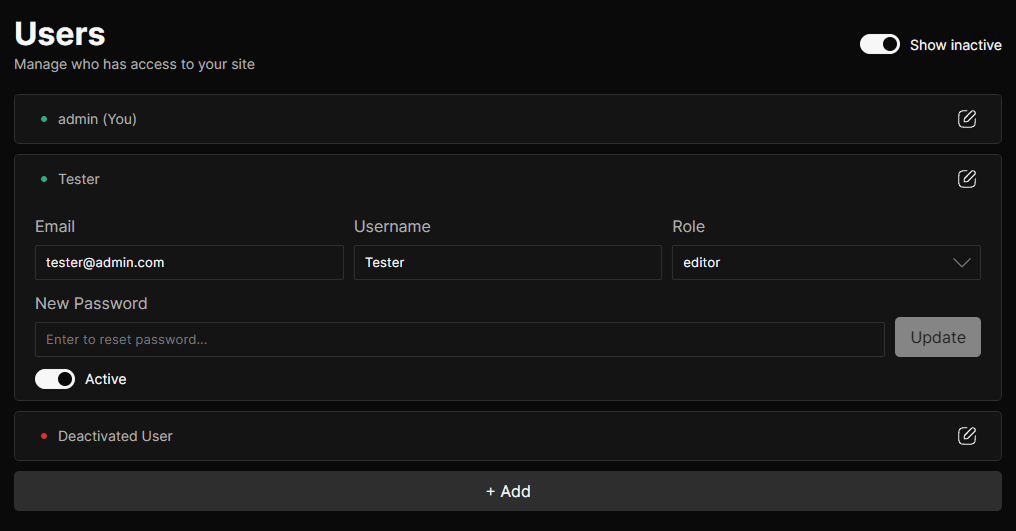
| Field | Description |
|---|---|
| Must be a valid email address. Saved automatically on input. | |
| Username | Display name shown throughout the CMS. Saved automatically on input. |
| Role | The role assigned to this user. Determines what they can see and do in the CMS. Only the admin can reassign roles, and cannot change their own. |
| Password | Enter a new password and click Update to reset. Cannot be changed for your own account or the admin account from this page. |
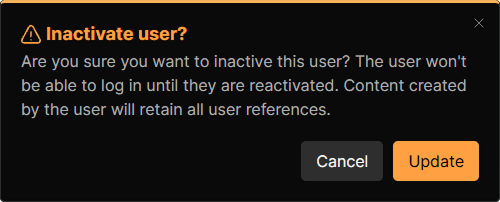
| Active | Toggle to deactivate or reactivate a user. Inactive users cannot log in. Content they created is preserved with all user references intact. |
Deactivating a User
Toggling a user’s Active switch to off will prompt for confirmation before deactivating the account. Deactivated users are hidden from the list by default. Use the Show inactive toggle in the page header to display them.
Access Rules
Not all fields are editable by all users. The following rules apply:
- View the users list
- Cannot modify any user account
- users:create can create new accounts
- Edit email and username on any account
- Reset another user's password
- Cannot edit the admin account's email or username
- Cannot reset their own password from this page
- Deactivate or reactivate any user account
- Cannot deactivate themselves or the admin account
- Assign or change roles on other users
- Cannot reassign their own role
Permissions
To work with users, a user must have at least one of the following permissions:
| Permission | Description |
|---|---|
users:read | Required to view the users list. |
users:create | Required to create new user accounts. |
users:update | Required to edit email, username, role, and password fields. |
users:delete | Required to deactivate or reactivate user accounts. |