Database Reference
Working with the database
WebcoreUI CMS is built on Astro DB backed by Turso. The schema is pre-defined and set up automatically. You do not need to design or modify it to use the CMS. This page serves as a reference for developers who want to understand the underlying data model or extend it for their own needs.
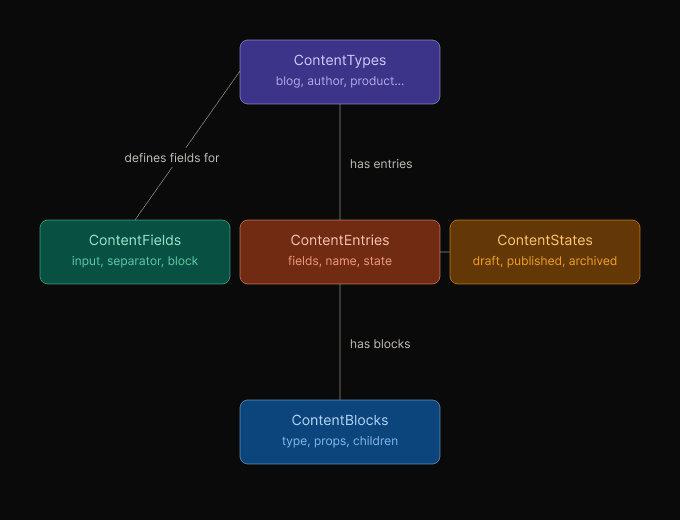
An overview of the database tables used by WebcoreUI CMS:
- ContentTypes: holds the content type definitions that structure your content model. Each record represents a type such as
blog,author, orproduct, along with its display name, description, and whether it supports block composition. - ContentFields: holds the field definitions belonging to each content type. Each record stores the field’s kind (
input,separator, orblock), its display label, and a configuration object that varies by kind — input type and props for input fields, block type and props for block fields. - ContentEntries: holds the individual content entries for each type. Each record stores the entry’s current state, a display name used in the CMS, and a JSON map of field values keyed by field name.
- ContentStates: holds the workflow states available for content entries. Each record maps a display name to one of three system states —
DRAFT,PUBLISHED, orARCHIVED— which determines whether entries in that state are included in production builds. - ContentBlocks: holds the blocks assigned to content entries that support block composition. Each record stores the block type, its prop values, any nested children, and its position within the entry’s block list.
For the complete column-level schema including all fields and references, see db/config.ts in your project.
Exploring the Database
To browse your local database visually, run:
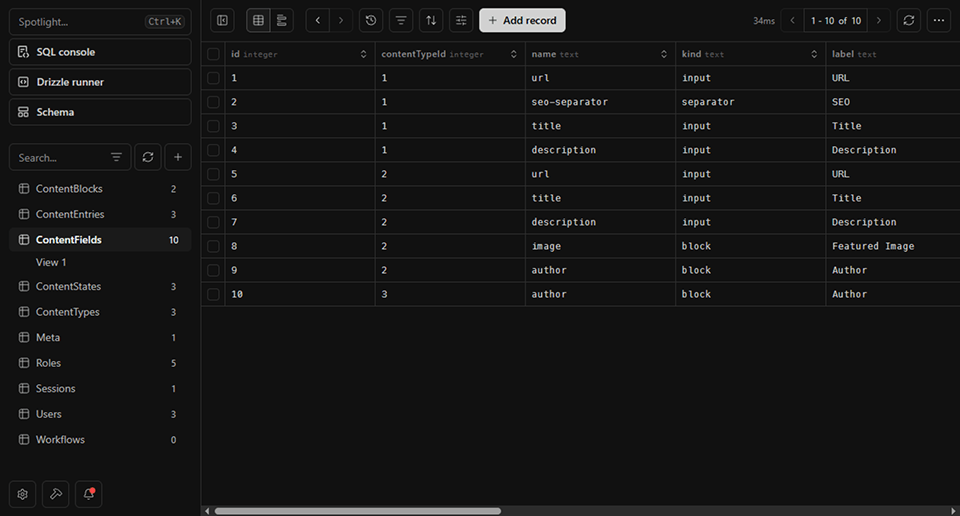
npm run dev:drizzleThis opens Drizzle Studio in your browser, where you can inspect tables, view records, and verify data without writing any queries. Note that this is a local instance of the database, not your remote database, so you’ll see data you’ve created in your local development environment.
Migration
While we aim to keep the database schema stable, we may need to make changes in the future. In these cases, you can run the following command to automatically apply migrations to your database:
npm run db:migratedb/migrations and are applied in order.