Setup
How to get the CMS up and running
WebcoreUI CMS is delivered as a private GitHub repository. Once you have access, clone it to your local machine and follow the steps below to get up and running.
Installing Dependencies
Make sure you have Node.js installed before proceeding. Then run the following command at the root of the project to install all required dependencies:
npm iSetting Up the Database
The CMS uses Astro DB backed by Turso for its data layer. While you can develop and play around with the application with local data, you’ll need to connect a remote database before the CMS can function fully on production.
Follow the steps below to set up your database:
- Create an account on Turso
- Create a new database and generate an access token from the Turso dashboard
- Add the following variables to your
.envfiles at the root of the project:ASTRO_DB_REMOTE_URL=your-database-urlASTRO_DB_APP_TOKEN=your-access-token - Push the schema to your remote database:npm run db:push
- Seed the database with the required default records:npm run db:seed
Your database is now ready. The schema is pre-defined, you don’t need to design it from scratch.
Starting the Dev Server
To start the development server against your local database, run:
npm run devTo develop against your remote Turso database instead, use:
npm run dev:prodExploring the Database
To inspect your local database visually, you can open Drizzle Studio by running:
npm run dev:drizzle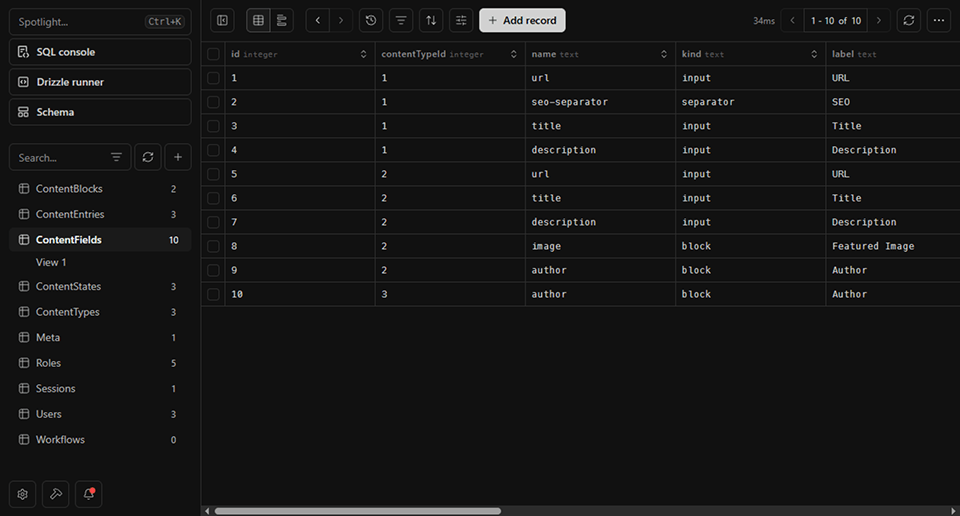
This gives you a live view of your tables, rows, and relationships — useful for debugging or verifying seed data. See the Drizzle Studio section for more details.
Keeping the Schema in Sync
When the CMS is updated and includes schema changes, run the following command to apply migrations to your remote database:
npm run db:migrateMigration queries are stored in db/migrations and are applied in order.
Building the Project
Depending on the environment, you can use the following commands to build the project:
# build against your **local** database:npm run build
# build against your **remote** Turso database for deployment:npm run build:prodbuild:prod when deploying. Builds against the local database will not have access to your live content.