References
Link content entries to each other
The Reference block is how WebcoreUI CMS handles relationships between content entries. Instead of duplicating data, a reference field on one entry points to another entry by ID, and the CMS resolves the full content of that entry.
A common example: a blog post has an author field of kind block set to Reference. When the blog post is rendered, the CMS fetches the referenced author entry and renders its blocks in place.
How It Works
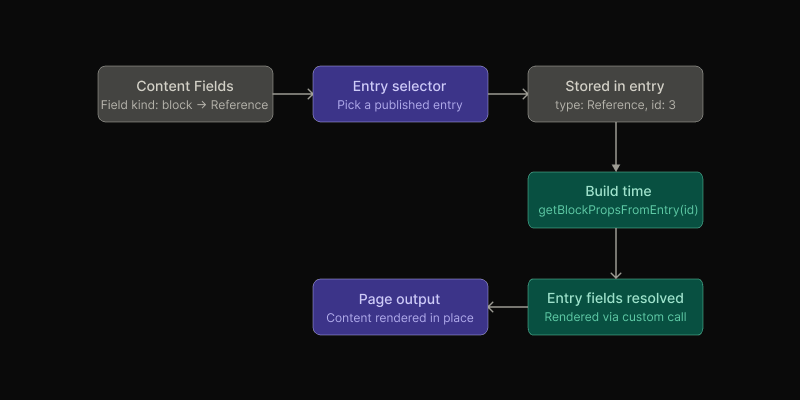
When a field of kind block is set to the Reference block type, the entry editor shows a searchable dropdown listing all published entries across all content types, grouped by type. Selecting an entry stores its ID as the field value.
At build time, the Reference block resolves the stored ID to the referenced entry and renders all of its block fields as components.
Using Reference as a Content Field
Let’s say you want to link authors to blog posts. You can do this by following these steps:
- Open the content type you want to add a reference to (e.g.
blog) - Add a new field, set its kind to
block, and set the block type toReference - Give it a label that reflects what it references (e.g.
Author) - The field will now appear as a grouped entry selector in the entry editor
This example is already set up with seed data for you to experiment with.
Using Reference as a Content Block
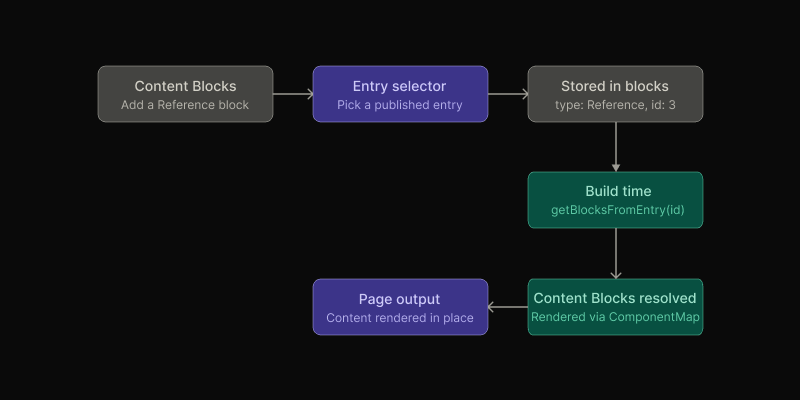
The Reference block is also available directly in the block builder for content types that have Supports Blocks enabled. It works the same way as a reference field. You select a published entry from the dropdown, and at build time the CMS fetches all block fields from that entry and renders them in place of the Reference block.
This is useful for reusing structured content across multiple pages without duplicating it. For example, a shared call-to-action entry, a team member profile, or a pricing table can be defined once and referenced from any number of pages through the block builder. Any update to the referenced entry is automatically reflected everywhere it is used on the next build.
ComponentMap rather than a helper function.Cross-Type References
References are not limited to a single content type. The selector groups all published entries by their content type, so a single reference field can point to an entry from any type in your project.
This makes it straightforward to model flexible relationships. For example, a page entry referencing a team-member, or a product entry referencing a category.
What Gets Rendered
When a referenced entry is resolved, every field on that entry that contains a block value is returned as a renderable block.
This means the content of a referenced entry is entirely controlled by how its content type is configured in the CMS. Changing the referenced entry’s block fields updates every place it is referenced, automatically on the next build.
Resolving References on the Frontend
Four helper functions are available for working with referenced entries in your Astro pages and components:
| Helper | Description |
|---|---|
getBlocksFromEntry(id) | Returns all block fields from the referenced entry as an array of blocks. |
getBlockFromEntry(id) | Returns the first block field from the referenced entry. |
getBlockPropsFromEntry(id) | Returns the props of the first block field. Use when you only need the data. |
getBlockChildrenFromEntry(id) | Returns the children of the first block field for block types that support children. |
All four helpers accept either a string or numeric entry ID and are typed with a generic parameter for the expected props shape. You can find an example usage in [...blog].astro. For example, to render an author referenced from a blog post:
---import type { AuthorProps } from '@components/Author/author'import { getBlockPropsFromEntry } from '@utils/server'
// Fetch the "author" block field from the referenced entryconst author = await getBlockPropsFromEntry<AuthorProps>(entry.fields.author?.props?.id)---
{author && <Author {...author} />}
To render all blocks from a referenced entry (the same way the Reference block itself works):
---import ComponentMap from '@components/ComponentMap/ComponentMap.astro'import { getBlocksFromEntry } from '@utils/server'
// Fetch all block fields from the referenced entryconst blocks = await getBlocksFromEntry(101)---
{!!blocks?.length && <ComponentMap components={blocks} />}