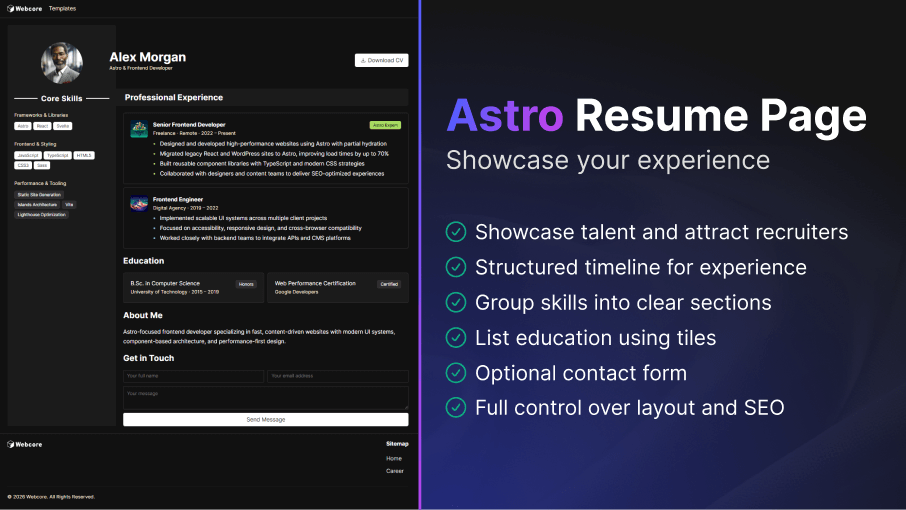
A professional resume is essential for presenting your skills, experience, and background clearly. This Astro template provides a clean, structured, and highly customizable layout that helps you create a polished resume with minimal setup.
How to Setup
---import Resume from '@templates/Resume.astro'
const layout = {    seo: { ... } // Your SEO configuration    menu: { ... } // Menu configuration    footer: { ... } // Footer configuration}
const avatar = { ... } // Avatar shown at the top of the sidebarconst cta = { ... } // An optional CTA button shown next to your nameconst skills = { ... } // List of your core skillsconst experiences = { ... } // List of your professional experienceconst education = { ... } // List of your educationconst contact = { ... } // Contact form information---
<Resume layout={layout} avatar={avatar} name="Alex Morgan" role="Astro & Frontend Developer" cta={cta} skillsTitle="Core Skills" skills={skills} experienceTitle="Professional Experience" experiences={experiences} education={education} contact={contact}> <h2>About Me</h2> <p>Additional content</p></Resume>---import Resume from '@templates/Resume.astro'
// Your layout with SEO, including menu and footerconst layout: ResumeProps['layout'] = { seo: { title: 'Resume Template - WebcoreUI', url: 'https://webcoreui.dev/', description: 'A customizable and easy to use template for professional resumes.', faviconUrl: '/logo.svg', canonical: 'https://webcoreui.dev/', prefetchGTAG: true, prefetchGA: true, meta: [ { name: 'keywords', content: 'cv' } ] }, menu: { logo: { html: logo }, items: [ { name: 'Templates', href: '/templates' } ] }, footer: { logo: { html: logo }, columns: [ { title: 'Sitemap', items: [ { name: 'Home', href: '/' } ] } ], subText: `© ${new Date().getFullYear()} WebcoreUI. All Rights Reserved.` }}
// Avatar shown at the top of the sidebarconst avatar: ResumeProps['avatar'] = { img: '/img/alex-morgan.png', alt: 'Astro Developer Profile Photo', size: 120, borderless: true}
// Your name and roleconst name: ResumeProps['name'] = 'Alex Morgan'const role: ResumeProps['role'] = 'Astro & Frontend Developer'
// An optional CTA button shown next to your nameconst cta: ResumeProps['cta'] = { text: 'Download CV', icon: downloadIcon, href: '#', target: '_blank'}
// Title of the section showing your core skills in the sidebarconst skillsTitle: ResumeProps['skillsTitle'] = 'Core Skills'
// List of your core skillsconst skills: ResumeProps['skills'] = [{ title: 'Frameworks & Libraries', items: [ { text: 'Astro' }, { text: 'React' }, { text: 'Svelte' } ]}]
// Title of the section showing your professional experienceconst experienceTitle: ResumeProps['experienceTitle'] = 'Professional Experience'
// List of your professional experienceconst experiences: ResumeProps['experiences'] = [{ img: { src: '/img/placeholder9.png', alt: 'Frontend logo', width: 50, height: 50 }, title: 'Frontend Engineer', subText: 'Digital Agency · 2019 – 2022', list: [ 'Implemented scalable UI systems', 'Focused on accessibility', 'Worked closely with backend teams' ], theme: 'info'}]
// List of your educationconst education: ResumeProps['education'] = [{ items: [{ label: 'B.Sc. in Computer Science', subText: 'University of Technology · 2015 – 2019', badge: { text: 'Honors', theme: 'secondary' } }]}]
// Contact form informationconst contact: ResumeProps['contact'] = { show: true, title: 'Get in Touch'}---
<Resume layout={layout} avatar={avatar} name={name} role={role} cta={cta} skillsTitle={skillsTitle} skills={skills} experienceTitle={experienceTitle} experiences={experiences} education={education} contact={contact}> <h2>About Me</h2> <p>Astro-focused frontend developer</p></Resume>type ResumeProps = { layout: LayoutProps avatar?: AvatarProps skillsTitle?: string skills: { title: string items: BadgeProps[] }[] name: string role?: string cta?: ({ text: string icon?: IconProps['type'] | string } & ButtonProps) experienceTitle?: string experiences: CardWithListProps[] educationTitle?: string education?: TilesProps[] contact?: { show?: boolean title?: string form?: FormField[] }}Key Features
- Customizable Sidebar Profile: Display your avatar, name, role, core skills, and optional call-to-action in a compact sidebar.
- Structured Experience Timeline: Showcase your professional experience using card-based sections with optional icons, lists, and themes to clearly communicate roles, responsibilities, and achievements.
- Flexible Skills Organization: Group skills into titled sections and present them as badges, making it easy to highlight technical stacks, tools, or competencies at a glance.
- Education Tiles Layout: Present education history using tile components that support labels, subtext, and optional badges for honors, certifications, or distinctions.
- Optional Contact Form Integration: Enable or disable a built-in contact section with configurable title and form fields, allowing visitors to reach out directly from your resume.
- Slot-Based Content Extension: Insert custom content such as an “About Me” section, personal summary, or additional blocks directly into the template using Astro slots.
- Full Layout & SEO Control: Configure SEO metadata, navigation menu, and footer content through the layout prop to ensure your resume is optimized for search engines and consistent with the rest of your site.
Documentation
We've collected the following documentations for you that can help you get the most out of this template: