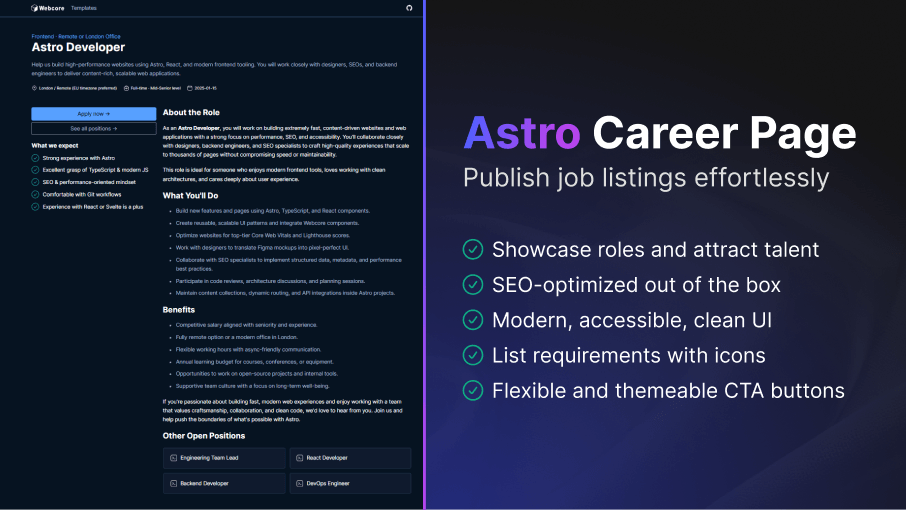
High-quality hiring starts with a high-quality career page. Build trust with candidates through a beautifully structured, professional job post. Reduce development time, keep brand consistency across roles, and publish new opportunities in minutes, not hours.
How to Setup
---import Career from '@templates/Career.astro'
const layout = {    seo: { ... } // Your SEO configuration    menu: { ... } // Menu configuration    footer: { ... } // Footer configuration}
const buttons = [ ... ] // CTA buttons, such as "Apply now" or "See all positions"const requirements = { ... } // List of position requirements, displayed under the CTA---
<Career layout={layout} role="Astro Developer" caption="Frontend · Remote or London Office" summary="Help us build high-performance websites..." location="London / Remote (EU timezone preferred)" contract="Full-time · Mid-Senior level" publishDate="2025-01-15" buttons={buttons} requirements={requirements}> Main content</Career>---import Career from '@templates/Career.astro'
// Your layout with SEO, including menu and footerconst layout: CareerProps['layout'] = { seo: { title: 'Career Page Template - WebcoreUI', url: 'https://webcoreui.dev/', description: 'A customizable and easy to use template for job posting.', faviconUrl: '/logo.svg' }, menu: { logo: { html: logo }, items: [ { name: 'Templates', href: '/templates' } ] }, footer: { logo: { html: logo }, columns: [ { title: 'Sitemap', items: [ { href: '/', name: 'Home' } ] } ], subText: `© ${new Date().getFullYear()} WebcoreUI. All Rights Reserved.` }}
// Role of the career, inserted into h1const role = 'Astro Developer'
// Caption, shown above the roleconst caption = 'Frontend · Remote or London Office'
// A short summary about the position, right below the h1const summary = 'Help us build high-performance websites.'
// Additional location info, displayed under summaryconst location = 'London / Remote (EU timezone preferred)'
// Additional contract info, displayed under summaryconst contract = 'Full-time · Mid-Senior level'
// Additional post date, displayed under summaryconst publishDate = '2025-01-15'
// CTA buttons displayed at the top of a sidebarconst buttons: CareerProps['buttons'] = [{ text: 'Apply now ->', href: '#', theme: 'info'}]
// List of position requirements, displayed under the CTAconst requirements: CareerProps['requirements'] = { title: 'What we expect', items: [{ icon: 'circle-check', text: 'Strong experience with Astro', color: 'var(--w-color-success)' }]}---
<Career layout={layout} role={role} caption={caption} summary={summary} location={location} contract={contract} publishDate={publishDate} buttons={buttons} requirements={requirements}> Main content</Career>type CareerProps = { layout: LayoutProps role: string caption?: string summary?: string location?: string contract?: string publishDate?: string buttons: ({ text: string icon?: IconProps['type'] | string } & ButtonProps)[] requirements?: { title?: string items: IconListProps['items'] }}Key Features
- SEO-optimized layout out of the box: Pre-configured meta tags and clean markup help your open roles get discovered faster.
- Modern, accessible UI components: Built with fast, semantic, accessibility-friendly components so your candidates get a smooth experience on any device.
- Flexible button actions: Add “Apply”, “Share”, “See All Jobs” or any custom CTA using themeable button styles.
- Requirements block with icons: Clearly communicate expectations using visual cues and color-coded indicators.
- Role-focused content structure: Includes role title, summary, contract type, location, publishing date, and CTA buttons to reduce setup time.
Documentation
We've collected the following documentations for you that can help you get the most out of this template: